API Docs
REST API and MCP tools for workout.chat
Connect to Claude.ai
workout.chat supports the Model Context Protocol (MCP), which means you can connect it directly to Claude.ai and chat with your workout data in natural language — log exercises, check your history, share workouts, and more.
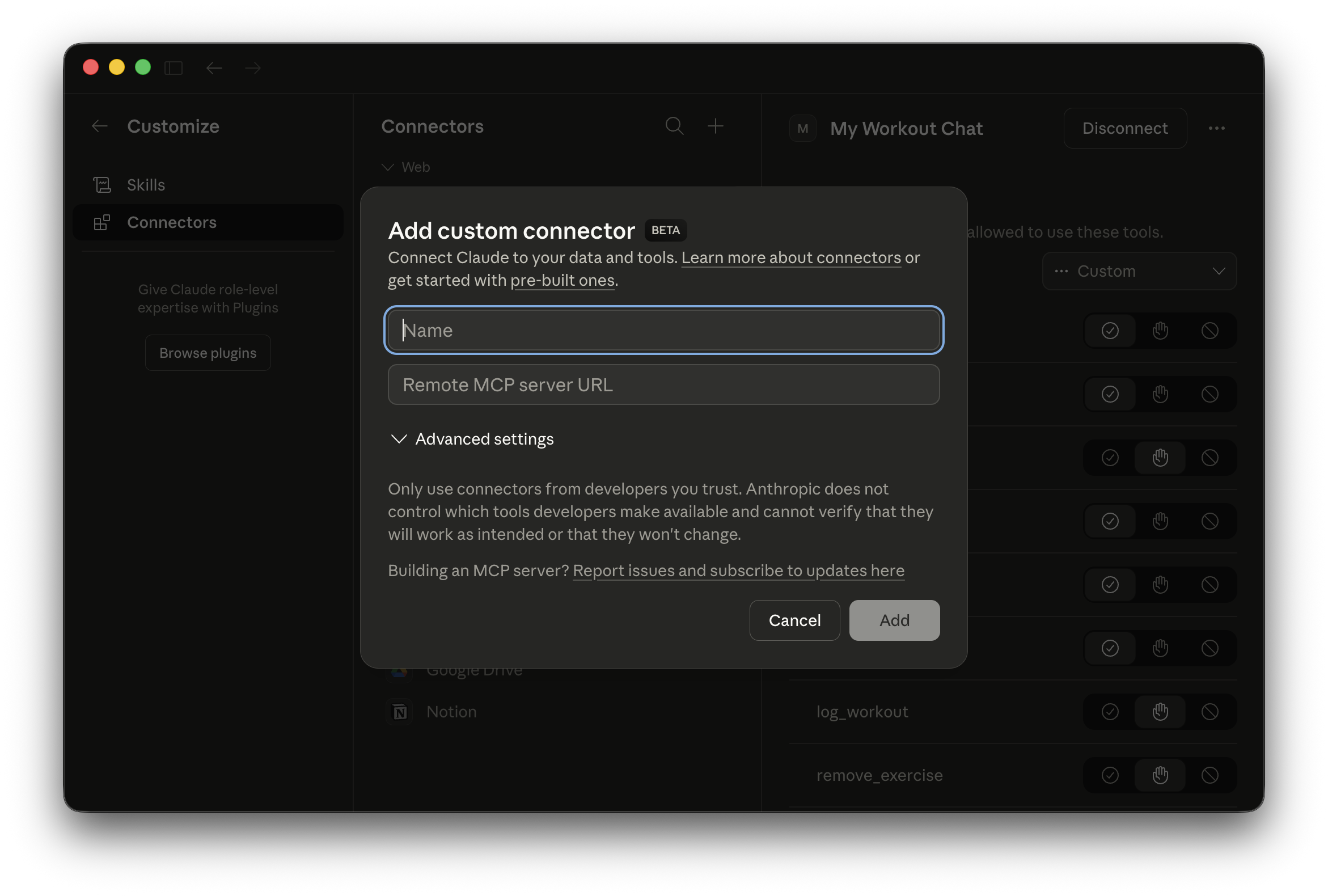
Steps
https://workout.chat/mcp
Authentication
The REST API uses session cookies for browser access. For external/programmatic access, use a Bearer token in the Authorization header.
Creating a token
POST to /mcp-tokens while logged in to generate a Bearer token.
curl -X POST https://workout.chat/mcp-tokens \
  -H "Content-Type: application/json" \
  -b "<session-cookie>" \
  -d '{"label": "my-script"}'

# Response
{"token": "abc123...", "label": "my-script"}
Using a token
curl https://workout.chat/api/workouts \
  -H "Authorization: Bearer <token>"
Base URL
https://workout.chat
All REST endpoints are prefixed with /api. Responses are JSON.
Workouts
| Query param | Type | Description |
|---|---|---|
| limitopt | integer | Max results, default 50 |
[
  {
    "id": 5,
    "user_id": 1,
    "performed_at": "2026-03-08T00:00:00",
    "title": "Back Day",
    "notes": null,
    "share_token": null,
    "created_at": "2026-03-08T20:57:33"
  }
]
| Body field | Type | Description |
|---|---|---|
| performed_at | string | ISO datetime, e.g. 2026-03-08T09:00:00 |
| titleopt | string | Workout name |
| notesopt | string | Free-form notes |
| raw_textopt | string | Original unparsed log text |
{"id": 14}
Updatable fields: performed_at, title, notes, raw_text
Exercises
| Body field | Type | Description |
|---|---|---|
| name | string | Exercise name |
| setsopt | integer | |
| repsopt | integer | |
| entered_weightopt | number | Weight as entered by user |
| entered_weight_unitopt | string | "lbs" or "kg" |
| weight_kgopt | number | Normalised weight in kg |
| duration_secondsopt | integer | |
| distance_kmopt | number | |
| notesopt | string | |
| positionopt | integer | Order within workout, default 0 |
{"id": 42}
Weigh-ins
| Query param | Type | Description |
|---|---|---|
| limitopt | integer | Max results, default 30 |
| Body field | Type | Description |
|---|---|---|
| date | string | ISO date, e.g. 2026-03-08 |
| weight_kg | number | Weight in kilograms |
{"id": 7}
Profile
{
  "id": 1,
  "name": "Sean",
  "email": "sean@example.com",
  "birth_year": 1990,
  "gender": "male",
  "height_cm": 178,
  "system": "imperial",
  "created_at": "2026-03-01T12:00:00"
}
Updatable fields: name, birth_year, gender, height_cm, system (metric or imperial)
{"ok": true}
MCP — Overview
workout.chat exposes a Model Context Protocol server at https://workout.chat/mcp. It accepts JSON-RPC 2.0 POST requests and is compatible with Claude Desktop, Cursor, and any other MCP client.
Discovery
https://workout.chat/.well-known/oauth-authorization-server
https://workout.chat/.well-known/oauth-protected-resource
MCP — OAuth Setup
The server implements OAuth 2.0 Authorization Code flow with PKCE and Dynamic Client Registration (RFC 7591). MCP clients like Claude Desktop handle this automatically.
Endpoints
curl -X POST https://workout.chat/oauth/register \
  -H "Content-Type: application/json" \
  -d '{"client_name": "My App", "redirect_uris": ["https://myapp.com/callback"]}'

# Response
{
  "client_id": "a1b2c3d4...",
  "client_name": "My App",
  "redirect_uris": ["https://myapp.com/callback"],
  "grant_types": ["authorization_code"],
  "token_endpoint_auth_method": "none"
}
| Query param | Description |
|---|---|
| client_id | From registration |
| redirect_uri | Must match registered URI |
| code_challenge | PKCE S256 challenge |
| code_challenge_method | S256 |
| stateopt | CSRF token |
| Body field | Description |
|---|---|
| code | Auth code from redirect |
| code_verifier | PKCE verifier |
| grant_type | authorization_code |
{"access_token": "abc123...", "token_type": "Bearer"}
MCP — Tools
These tools are available to any connected AI assistant. All tools operate on the authenticated user's data only.
Workouts
Log exercises for a workout session. By default appends to the most recent workout from the same day (within 4 hours) to keep exercises grouped. Set new_workout=true to force a new session.
| Parameter | Type | Description |
|---|---|---|
| exercises | array | List of exercise objects (see below) |
| performed_atopt | string | ISO date, defaults to today |
| titleopt | string | Workout name, e.g. "Push Day" |
| notesopt | string | Free-form notes |
| new_workoutopt | boolean | Force a new workout record |
Each exercise object:
| Field | Type | Description |
|---|---|---|
| name | string | Exercise name |
| setsopt | integer | |
| repsopt | integer | |
| weightopt | number | |
| weight_unitopt | string | "lbs" or "kg", default "lbs" |
| duration_secondsopt | integer | |
| distance_kmopt | number | |
| notesopt | string |
List the user's most recent workouts.
| Parameter | Type | Description |
|---|---|---|
| limitopt | integer | Max results, default 10 |
Get a specific workout with all its exercises. Exercise IDs are included so they can be referenced for updates.
| Parameter | Type | Description |
|---|---|---|
| workout_id | integer |
Correct a previously logged exercise. Only pass the fields that need to change — all others are left as-is.
| Parameter | Type | Description |
|---|---|---|
| exercise_id | integer | From log_workout or get_workout |
| nameopt | string | |
| setsopt | integer | |
| repsopt | integer | |
| weightopt | number | |
| weight_unitopt | string | |
| duration_secondsopt | integer | |
| distance_kmopt | number | |
| notesopt | string |
Delete a mistakenly logged exercise entry.
| Parameter | Type | Description |
|---|---|---|
| exercise_id | integer |
Generate a public share link for a workout. Calling this multiple times for the same workout returns the same URL.
| Parameter | Type | Description |
|---|---|---|
| workout_id | integer |
{"url": "https://workout.chat/w/abc123xyz", "workout_id": 5}
Weigh-ins
Record the user's body weight. Upserts on date — logging twice on the same day updates the existing entry.
| Parameter | Type | Description |
|---|---|---|
| weight | number | Numeric value |
| unitopt | string | "lbs" or "kg", default "lbs" |
| dateopt | string | ISO date, defaults to today |
List recent body weight entries.
| Parameter | Type | Description |
|---|---|---|
| limitopt | integer | Max results, default 30 |
Profile
Get the current user's profile including name, height, birth year, and preferred unit system.
Update profile fields. Only pass fields that should change.
| Parameter | Type | Description |
|---|---|---|
| nameopt | string | |
| birth_yearopt | integer | |
| genderopt | string | e.g. "male", "female" |
| height_cmopt | integer | |
| systemopt | string | "metric" or "imperial" |
Utility
Returns today's date and current time. Used to ensure workout dates are logged correctly.
{"date": "Monday, March 09, 2026", "time": "14:32"}